
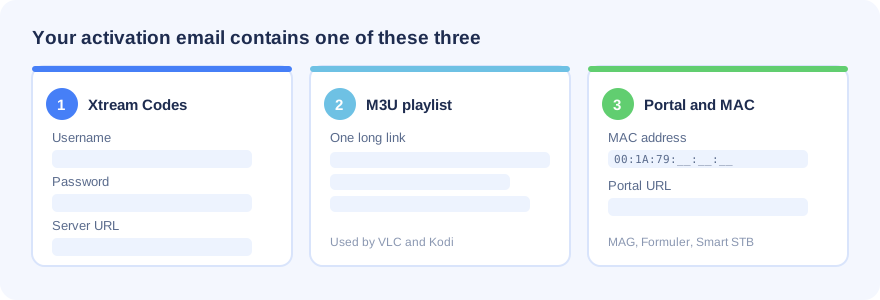
As soon as your order is confirmed we email your login details. Keep that email open, because every method below uses one of these three formats:
- Xtream Codes login which is a username, a password and a server URL. This is the easiest option and works in most apps.
- M3U playlist URL which is one long link. Used by VLC, Kodi and a few smart TV players.
- Portal URL and MAC address used by MAG boxes, Formuler and Smart STB. Send us the MAC address of your device, we register it, then we send your portal link back.
For smooth playback we recommend at least 15 Mbps for HD and 25 Mbps or more for 4K and 8K. A wired ethernet connection is always steadier than Wi-Fi.
If any step below does not work on your device, message us on WhatsApp or live chat. We will finish the setup for you at no extra cost.
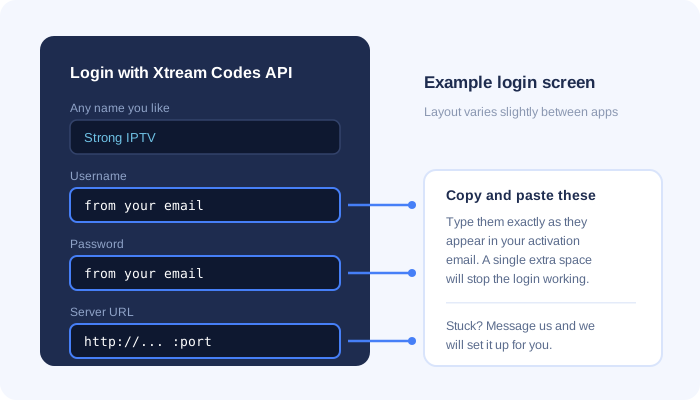
What the login screen looks like
Samsung runs Tizen and LG runs webOS, so neither can install Android apps. Use one of the players below.
Option 1: Smarters Player Lite (recommended)
- Open the app store on your TV, which is Samsung Apps or the LG Content Store.
- Search for Smarters Player Lite and install it.
- Open the app and choose Login with Xtream Codes API.
- Type any profile name you like, then enter the username, password and server URL from your activation email.
- Select Add User and wait while your channels, movies and series load.
Option 2: IBO Player
- Install IBO Player from your TV app store and open it.
- Write down the MAC address and device key shown on the screen.
- Send both to us on WhatsApp. We upload your playlist to the player and confirm when it is ready.
- Restart the app and your channels will be there.
A few older Samsung and LG models will not run either app. If yours is one of them, use the Smart STB method or plug an Android TV box or Firestick into the TV instead.
- Open the Google Play Store and install IPTV Smarters Pro, XCIPTV or OTT Navigator. Any of the three works well.
- Launch the app and select Add User or Add Playlist.
- Choose Xtream Codes API as the login type.
- Enter a profile name, then your username, password and server URL exactly as they appear in your email. Watch out for extra spaces.
- Confirm and wait for the channel list to download.
If you want a cable style channel grid with a full TV guide, TiviMate and OTT Navigator give the best experience on Android TV boxes.
Easiest method
- From the Fire TV home screen open Find and then Search.
- Search for IPTV Smarters Pro and install it from the Amazon Appstore.
- Open the app, choose Login with Xtream Codes API, then enter your username, password and server URL.
If the app is not offered in your region
- Go to Settings, then My Fire TV, then Developer Options.
- Turn on Apps from Unknown Sources.
- Back on the home screen, search for Downloader and install it.
- Contact our support team. We will send you the correct download link for your device. Enter it in Downloader and select Go.
- Install the app, open it and sign in with your Xtream Codes details.
Only install player apps from the official Amazon Appstore or from a link our team gives you. Files from unknown sites are often repackaged with unwanted software.
- Open the App Store and install Smarters Player Lite.
- Open the app and accept the terms of use.
- Select Login with Xtream Codes API.
- Enter a profile name plus the username, password and server URL from your activation email.
- Select Add User to load your channels.
Apple TV owners can install the same app from the tvOS App Store. iOS 12 or newer is required.
Option 1: VLC Media Player
- Download VLC from videolan.org and install it.
- On Windows open Media and then Open Network Stream. On Mac open File and then Open Network.
- Paste the M3U playlist URL from your activation email.
- Select Play, wait for the list to load, then open View and Playlist to browse channels.
VLC plays the streams but does not show categories or the TV guide.
Option 2: IPTV Smarters Pro for desktop
Download the Windows or macOS build from the official IPTV Smarters website, install it, then sign in with your Xtream Codes username, password and server URL. This version gives you categories, the TV guide and the full video on demand library.
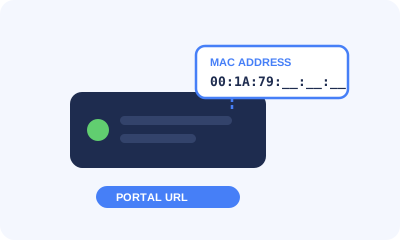
- Go to Settings, then System Settings, then Device Info, and note the MAC address. It looks similar to 00:1A:79:XX:XX:XX.
- Send that MAC address to us on WhatsApp or live chat.
- We register it on our server and send your portal URL back to you.
- On the box open Settings, then System Settings, then Servers, then Portals.
- Type a name into Portal 1 Name and paste the portal URL into Portal 1 URL.
- Save and restart the box. Your channels load automatically on the next boot.
Formuler boxes come with the MyTVOnline player built in.
- Open MyTVOnline from the home screen.
- Select Add Portal or Add Playlist.
- For the portal method, send us the MAC address shown in the box settings and we will reply with your portal URL. For Xtream Codes, pick that option and enter your username, password and server URL.
- Save, then reload the portal to pull in your channels and TV guide.
Formuler boxes also run Android, so IPTV Smarters Pro or TiviMate from the Play Store work as an alternative.
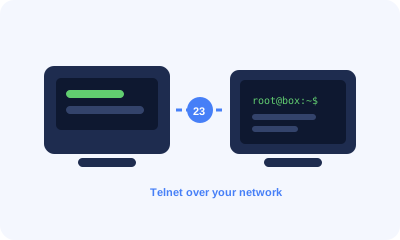
This method uses a Windows computer to send your playlist to the receiver across your home network.
- On the receiver go to Menu, then Setup, then System, then Network, then Adapter Settings, and note the IP address. It normally starts with 192.168.
- On your computer download PuTTY from the official PuTTY website.
- Open PuTTY, enter the IP address from step 1, set the port to 23 and the connection type to Telnet, then select Open.
- Log in. Unless you changed it, the username and the password are both root.
- Copy the installation line from your activation email, paste it into the window with a right click, then press Enter.
- Type reboot and press Enter. Once the receiver restarts you will find a new IPTV bouquet holding all of your channels.
Dreamlink T1, T1 Plus, T2 and T6
- Let the box finish starting up and complete any firmware update it offers.
- When the server menu appears press Exit and confirm with OK. The MAC address is in the top right corner of the main screen.
- Send us that MAC address so we can register it and issue your portal URL.
- Open Settings and press the green button on the remote to reach the edit screen.
- Enter Adult IPTV as the portal name and paste in your portal URL.
- Confirm, restart the box, and start watching.
OpenBox
- On a computer, open your M3U playlist URL in a browser and save the file with the name Adult IPTV.
- Copy that file onto a USB stick and plug the stick into the back of the OpenBox.
- On the remote press Menu, then go to Network Local Settings and then Network App.
- Select your playlist, press the yellow button to read it from USB, and wait for the success message.
- Open Kodi and go to Settings, then Add-ons, then Install from repository.
- Choose PVR clients and install PVR IPTV Simple Client.
- Open the add-on settings and set the location to Remote path.
- Paste your M3U playlist URL into the M3U field. To get the TV guide as well, paste the EPG URL from your email into the EPG field.
- Enable the add-on and restart Kodi. Your channels then appear under TV on the main menu.
The app says the account is invalid or no channels load
Check the username, password and server URL for typos and stray spaces. Copying and pasting straight from the email avoids most of these mistakes.
Streams freeze or buffer
Restart your device and your router first. Move to an ethernet cable instead of Wi-Fi if you can. If your internet provider slows down streaming traffic, a VPN usually clears it up.
Some channels work and others do not
An individual channel can drop at the source for a short time. Send us the channel name and we will check the feed and fix it.
Picture quality is lower than expected
Test your connection speed first, since 4K and 8K need roughly 25 Mbps held steady. Also check that the player is not set to a lower quality preset.
Still stuck
Contact us on WhatsApp or live chat with your device model and a short description of what you see on screen. Our team is available 24 hours a day and can complete the setup remotely for you.